
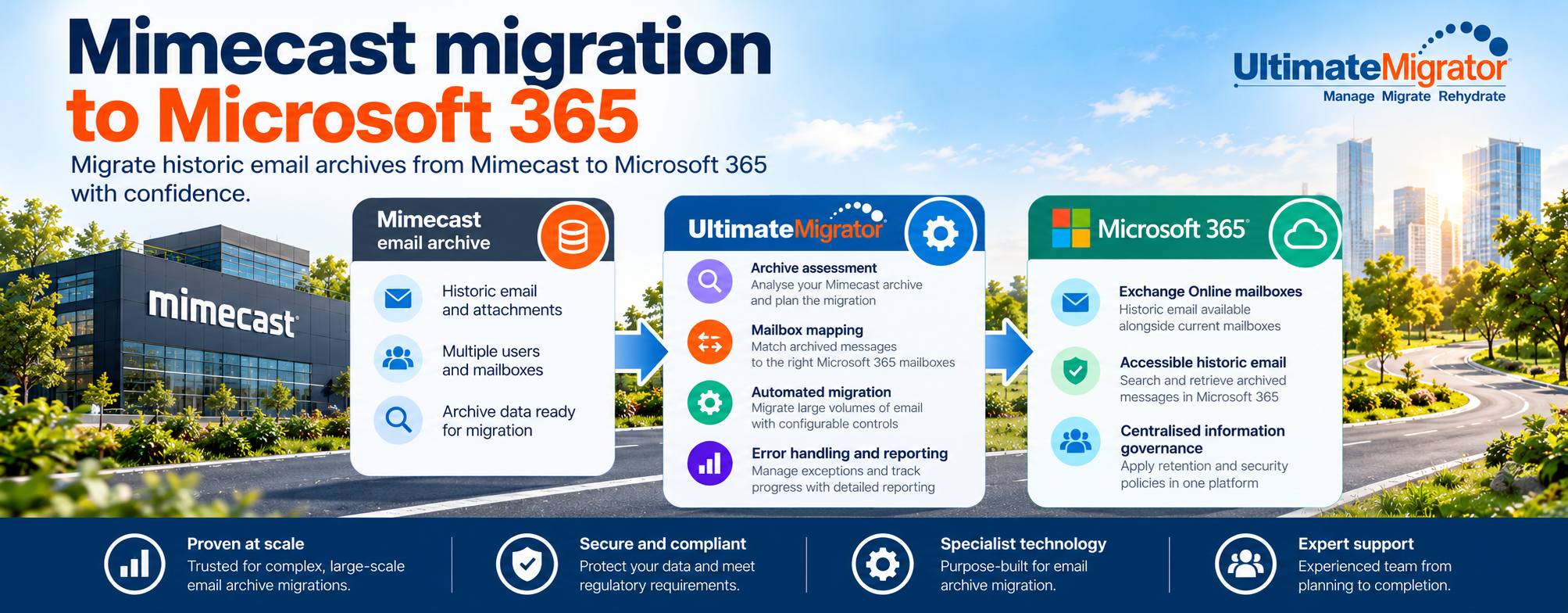
Mimecast migration to Microsoft 365
Migrating historic email archives from Mimecast to Microsoft 365 requires careful planning, specialist migration technology and a reliable approach to preserving business-critical information. Organisations need to ensure that archived messages remain accessible, searchable and securely managed throughout the transition.
Ultimate Migrator provides specialist Mimecast archive migration software to help organisations migrate historic email from Mimecast into Microsoft 365, including Exchange Online. Our technology supports large-scale archive migrations through automated processing, mailbox mapping, configurable migration controls, intelligent error handling and detailed reporting.
Whether you are consolidating email platforms, reviewing your archiving strategy or preparing to retire an existing archive, Ultimate Migrator helps address common migration challenges:
- Extracting large volumes of historic email from Mimecast archives.
- Mapping archived messages to the correct Microsoft 365 mailboxes.
- Preserving email content, attachments and important message metadata.
- Managing corrupt, inaccessible or problematic messages.
- Maintaining visibility of migration progress and outstanding exceptions.
- Validating migrated data before retiring the existing archive platform.
Our software combines automated migration processing, configurable scheduling, error handling and detailed reporting. A centralised management console gives migration teams visibility and control throughout the project, helping organisations manage complex Mimecast to Microsoft 365 migrations efficiently.
How Mimecast archive migration works
Moving from Mimecast to Microsoft 365 involves more than transferring email messages. Organisations need to understand their existing archive, identify the appropriate destination for historic messages and ensure that migration activity can be monitored and validated.
Ultimate Migrator provides a structured approach to Mimecast archive migration, helping organisations manage each stage of the process.
1) Assess your Mimecast archive
The first stage is to understand the size, structure and scope of the existing Mimecast archive. This includes identifying the users and mailboxes involved, estimating historic email volumes and establishing which information needs to be migrated.
Migration planning should consider retention requirements, mailbox ownership, destination capacity and any archive data that requires special handling.
A clear understanding of the source environment helps organisations establish realistic migration schedules, identify potential risks and avoid unnecessary disruption.
2) Map users and prepare Microsoft 365
Accurate mailbox mapping is essential when migrating historic email from Mimecast to Microsoft 365. Messages must be associated with the correct destination mailboxes, including where users have changed addresses, left the organisation or been affected by previous system migrations.
Ultimate Migrator supports the mapping and management of migration destinations, helping organisations maintain control over where archived messages are transferred.
Preparing the Microsoft 365 environment also involves reviewing mailbox availability, access permissions, storage requirements and any relevant retention or compliance policies.
3) Migrate historic email to Exchange Online
Once the source and destination environments have been prepared, Ultimate Migrator manages the transfer of historic email from Mimecast into Microsoft 365.
Automated processing and configurable migration controls help organisations manage large volumes of archived messages while reducing manual intervention.
Our software is designed to help migration teams manage common challenges, including:
- Large archive volumes requiring controlled migration batches.
- Temporary connectivity problems between source and destination systems.
- Messages that cannot be processed successfully on the first attempt.
- Destination mailbox limitations or configuration issues.
- Migration exceptions requiring investigation.
Intelligent error handling, retry management and detailed reporting help administrators identify problems and manage outstanding work without unnecessarily interrupting the wider migration.
4) Validate the migration and prepare for archive retirement
Successful Mimecast migration is not simply about transferring messages. Organisations also need to understand what has been migrated, identify outstanding exceptions and confirm that historic email is accessible in the destination environment.
Ultimate Migrator provides migration reporting to support reconciliation, investigation and project sign-off.
Once the organisation has completed its validation activities and confirmed that relevant retention and compliance requirements are satisfied, it can plan the retirement of the legacy archive environment.
Benefits of migrating Mimecast archives to Microsoft 365
Consolidating historic email within Microsoft 365 can help organisations simplify their messaging infrastructure, reduce reliance on separate archiving platforms and improve access to business information.
Centralised access to historic email
Moving archived messages into Exchange Online can make historic email easier for authorised users to access alongside their current mailbox data, subject to the organisation’s Microsoft 365 configuration.
Simplified email infrastructure
Consolidating messaging and historic email can reduce the number of separate platforms that IT teams need to maintain, monitor and administer.
Improved information governance
Microsoft 365 provides tools for managing retention, information protection and eDiscovery. Migrating historic email into an appropriately configured environment can help organisations apply more consistent information governance policies.
Reduced reliance on legacy archive systems
Completing a controlled migration can support the retirement of an existing archive platform, potentially reducing ongoing licensing, administration and infrastructure costs.
Why choose Ultimate Migrator for Mimecast migration?
Ultimate Migrator specialises in email archive migration technology, helping organisations move historic messaging data between enterprise archiving and email platforms.
Our software is designed to support complex migration requirements through:
- Specialist connectors for supported source and destination platforms.
- Automated migration processing and configurable scheduling.
- Mailbox mapping and migration management.
- Intelligent error handling and retry mechanisms.
- Detailed reporting and visibility of migration progress.
- Support for large-scale, enterprise email archive migration projects.
Our experience includes complex email archive migration programmes such as the Enterprise Vault to NHSmail migration for NHS Wales, supporting approximately 180,000 users.
Whether your organisation is moving from Mimecast to Microsoft 365, consolidating email archives or reviewing its long-term information management strategy, Ultimate Migrator provides specialist technology to help deliver a controlled and auditable migration.
Frequently asked questions about Mimecast migration
Can you migrate Mimecast archives to Microsoft 365?
Yes. Ultimate Migrator provides specialist migration technology for transferring historic email from supported Mimecast archive environments into Microsoft 365, including Exchange Online. The migration approach depends on the source environment, destination configuration and project requirements.
Can historic Mimecast emails be migrated into Exchange Online mailboxes?
Yes. Archived email can be migrated into supported Exchange Online destinations, with mailbox mapping used to associate messages with the appropriate users.
Will email attachments and metadata be preserved?
Ultimate Migrator is designed to preserve important email information during migration, including message content, attachments and supported metadata. The exact information retained depends on the source data, migration configuration and destination capabilities.
How long does a Mimecast migration take?
Migration timescales depend on factors including archive size, message volumes, source and destination performance, available connectivity and the organisation’s migration requirements. An initial assessment helps establish a realistic migration plan.
Can we retire Mimecast after migrating our archive?
Migration can support the retirement of an existing Mimecast archive once the organisation has verified that required data has been transferred, outstanding exceptions have been addressed and relevant legal, retention and compliance requirements have been satisfied.
Planning a Mimecast migration to Microsoft 365?
Ultimate Migrator can help you assess your existing archive, understand your migration options and plan the transfer of historic email into Microsoft 365.
Contact our migration specialists to discuss your requirements.