
Shortcut rehydration for email archive migration
 When organisations migrate from legacy email archives to Microsoft 365, Microsoft Exchange or another messaging platform, archived email shortcuts can create a significant challenge. These shortcuts may remain in users’ mailboxes even after the original messages have been moved or the legacy archive has been decommissioned.
Ultimate Migrator provides specialist shortcut rehydration software that identifies archived email shortcuts, retrieves the corresponding original messages and restores them to the appropriate destination. This helps organisations maintain access to historic email, reduce dependency on legacy archive platforms and prepare for safe decommissioning.
What is email shortcut rehydration?
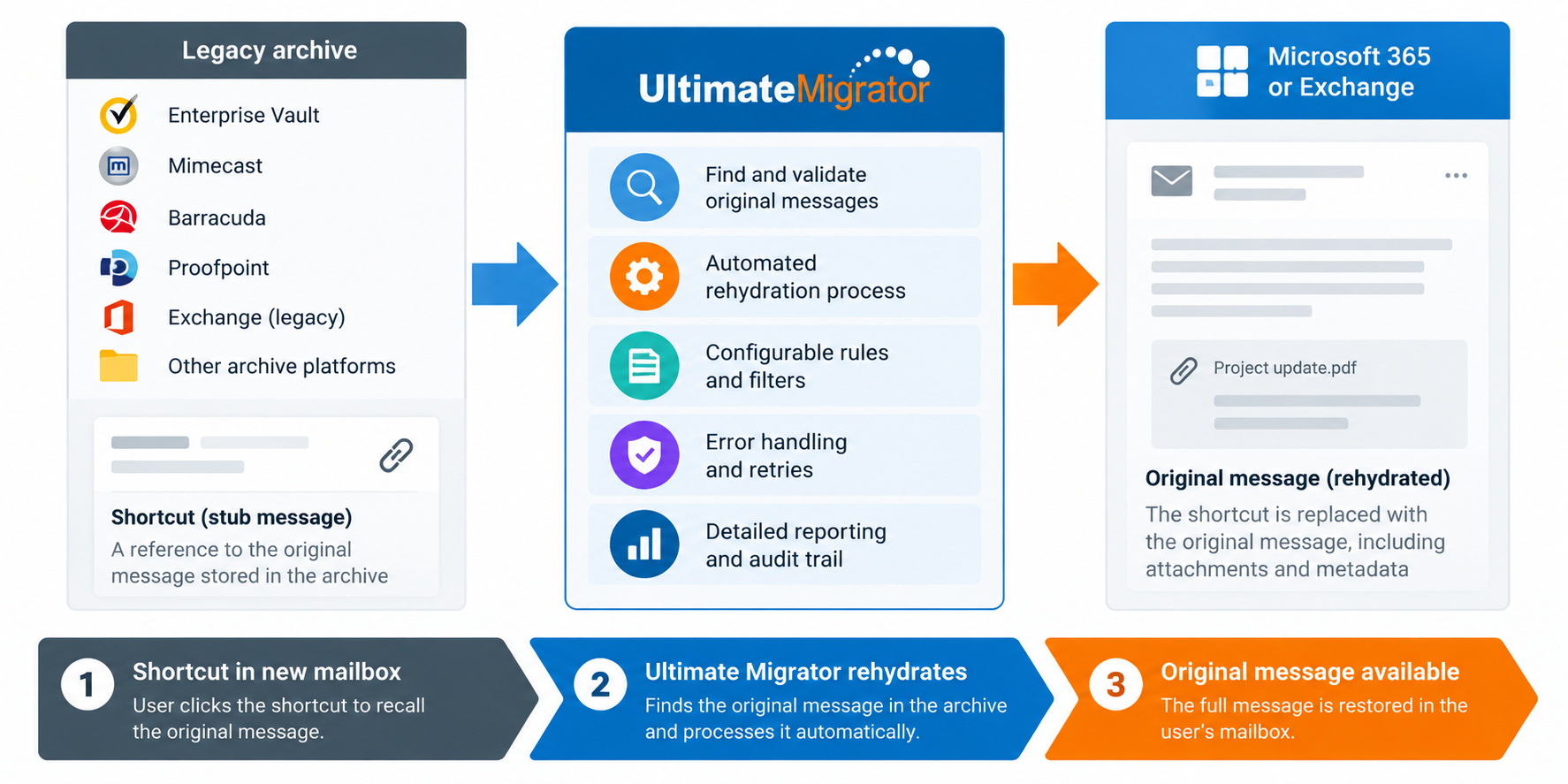
Email archiving platforms such as Enterprise Vault, Dell EMC SourceOne, Zantaz EAS and Commvault can replace archived messages with lightweight shortcuts, sometimes called stub messages. These shortcuts remain visible in Microsoft Outlook, allowing users to retrieve the original messages from the archive when required.
However, if the archive platform is retired without addressing these shortcuts, users may be left with messages that no longer open correctly because the original archive is unavailable.
Shortcut rehydration reverses this process. Ultimate Migrator identifies the shortcut, locates the original archived email and restores the complete message, including its attachments, to the appropriate mailbox, archive or supported destination.
Once rehydration is complete, users can access their historic email without relying on the original archive infrastructure.
Shortcut rehydration in Microsoft 365 and Exchange
Ultimate Migrator supports shortcut rehydration for Microsoft 365, Microsoft Exchange mailboxes, personal archives and supported public folder environments.
Our software uses a structured process designed to help organisations plan and manage shortcut rehydration projects.
1) Discover shortcuts and assess storage requirements
The first stage identifies shortcuts within the selected mailboxes, archives or public folders and determines the estimated size of the original archived messages.
This discovery process provides visibility of how much additional storage may be required when the original messages are restored. It is particularly valuable when planning migrations to Microsoft 365, where mailbox and archive capacity limits must be considered.
Discovery reporting helps organisations understand the scale of the rehydration project and plan the migration accordingly.
2) Restore original archived messages
Once discovery is complete, Ultimate Migrator retrieves the original messages from the legacy archive and replaces the corresponding shortcuts in the destination environment.
Rehydration can be managed on a per-user or public folder basis, with centralised batch management, scheduling and end-user notifications.
Our software is designed to minimise disruption while restoring access to historic email, allowing organisations to manage large-scale rehydration projects without unnecessary manual intervention.
3) Monitor progress and investigate exceptions
Legacy archives can contain messages that are corrupt, inaccessible or otherwise difficult to retrieve. Temporary connectivity issues and destination limitations can also affect processing.
Ultimate Migrator provides progress monitoring, error handling and detailed reporting to help migration teams identify exceptions, investigate outstanding issues and track the results of shortcut rehydration.
This visibility is important when preparing to decommission an archive platform, as organisations need confidence that users can continue accessing their historic information.
Shortcut rehydration in file systems
Email shortcuts are not always confined to Microsoft Outlook or Exchange mailboxes. Some organisations also retain historic email messages as MSG files within shared folders, project directories and file servers.
Where an archived email was dragged from Outlook into a file-system folder, the resulting MSG file may contain an archive shortcut rather than the complete original message.
If the legacy archive is subsequently decommissioned, these files may no longer provide access to the original email.
Ultimate Migrator can discover MSG files within supported file-system locations, identify archive shortcuts and retrieve the corresponding original messages.
As with mailbox rehydration, the process begins with discovery and reporting to identify affected files and estimate storage requirements. The original messages can then be restored in place, with centralised scheduling, batch management and progress reporting.
This helps organisations preserve access to historic email stored outside their primary messaging environment.
Supporting Enterprise Vault decommissioning
Shortcut rehydration is an important consideration for organisations planning to retire Enterprise Vault or another legacy email archive platform.
Simply migrating archive data does not necessarily resolve shortcuts remaining in user mailboxes or shared file systems. These dependencies must be identified and addressed before the original archive infrastructure can be safely retired.
Ultimate Migrator supports this process through automated discovery, message restoration, exception handling and reporting.
For organisations undertaking a wider migration project, our specialist Enterprise Vault migration software can help move historic email into Microsoft 365 and other supported destinations.
Why choose Ultimate Migrator?
Ultimate Migrator combines specialist email archive migration technology with practical experience of complex migration and decommissioning projects.
Our shortcut rehydration capabilities help organisations:
- Restore original email messages from legacy archive shortcuts.
- Maintain access to historic email and attachments.
- Discover shortcuts before migration and assess storage requirements.
- Automate mailbox, archive and supported file-system rehydration.
- Manage large-scale processing through scheduling and batch controls.
- Monitor progress, investigate exceptions and report on outcomes.
- Reduce dependencies on legacy archive infrastructure before decommissioning.
Whether you’re migrating to Microsoft 365, consolidating legacy email archives or preparing to decommission Enterprise Vault, Ultimate Migrator provides the technology to help restore historic messages and manage shortcut rehydration with confidence.